As someone types, AI Autocomplete shows what the product can do, surfaces the choices that matter, and helps the user add the details needed to complete the action.
The completed request is then passed to the system that already handles it, whether that is a search engine, chatbot, or agent.
AI Autocomplete completes the request before submit. Search, chat, or an agent handles the request after submit.
That is why AI Autocomplete is best understood as an intent layer. It turns an incomplete idea into a rich, structured request the product can act on.
Why AI Autocomplete matters
Software used to make its capabilities visible. Buttons showed what users could click. Menus showed where they could go. Forms showed which information the product needed.
AI products are increasingly replacing those interfaces with one blank text box. That text box is powerful because the user can ask for almost anything. But it is also difficult because it shows almost nothing. The user has to guess:
- What can this product do?
- What should I type?
- Which details matter?
- What information does the product need before it can act?
Most users respond by typing something short and vague. A shopper types "shoes". A customer tells support "it is broken". A user asks an agent to "build a running app". The product may be capable of doing something excellent, but the request does not contain enough information.
This is the blank text box problem.
Chat is good for speed and flexibility. Traditional UI is good for discoverability and precision. AI Autocomplete combines the two. The user can type naturally, while the interface reveals the relevant options and captures precise information in real time.
Traditional autocomplete vs AI Autocomplete
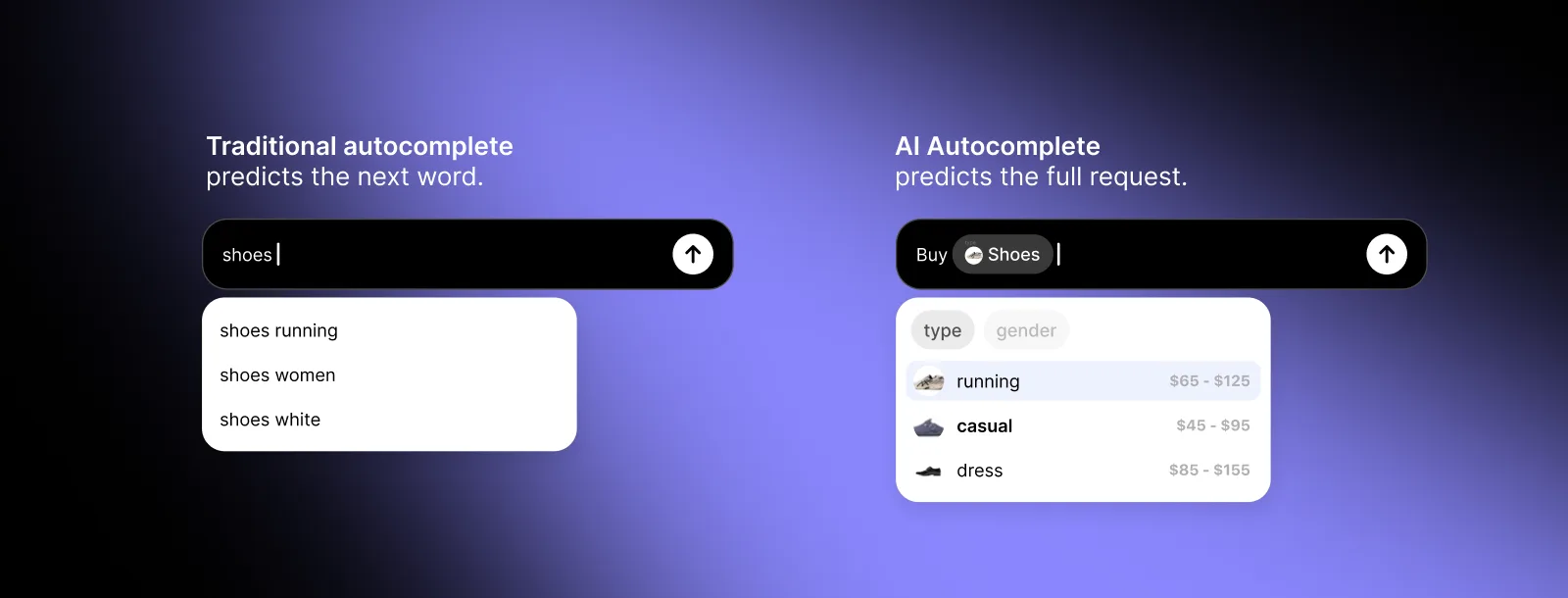
Traditional autocomplete predicts the next word
Traditional autocomplete compares the text being typed with indexed phrases, popular searches, or historical data.
User types → the system finds a matching phrase → it predicts the next word
For example: "run" → "running shoes". This is useful, but it usually creates only a slightly longer version of the original search.
AI Autocomplete predicts the full request
AI Autocomplete looks at the user's real-time intent, the current context, what the product can do, and which details are needed to complete the action.
User types → AI Autocomplete understands the intent → it reveals relevant choices → it completes the request
For example: "running shoes" → "women's waterproof trail shoes, size 8, under $150". Traditional autocomplete completes a phrase. AI Autocomplete completes the request.
AI Autocomplete can replace the traditional autocomplete layer because it performs the same basic job and goes much further. See the full comparison of traditional autocomplete and AI Autocomplete. It does not replace the search engine, chatbot, or agent that handles the completed request.
How AI Autocomplete works
AI Autocomplete is a real-time action engine built directly into the text box. It works in four steps.
1. It understands the intent
As the user types, AI Autocomplete considers the words they have entered, the current context, and the actions available inside the product. The system does not only ask, "What word probably comes next?" It asks, "What is this user trying to accomplish?"
2. It shows the choices that matter
Once the intent begins to form, AI Autocomplete surfaces the most useful next options. For a shopping request, that may include category, size, brand, color, budget, inventory, delivery time, or payment method. For an agent, it may include features, integrations, permissions, design preferences, or output format.
The user does not need to know those options exist before beginning. The interface introduces them when they become relevant.
3. It captures structured information
Every selection can be stored as a parameter rather than simply appended as text. For example:
Buy sports shoes → black → Nike → Pegasus → under $150 → size 8
can become:
{ action: buy, category: sports shoes, color: black, brand: Nike, model: Pegasus, max_price: 150, size: 8 }
The experience feels like a conversation, but the product receives clean, structured information like a form.
4. It passes the full request downstream
AI Autocomplete does not need to retrieve the results, answer the question, or perform the action itself. It hands the completed request to the existing system. That system can then search, answer, create, recommend, or act with far less guessing.
The intent layer before search, chat, and agents
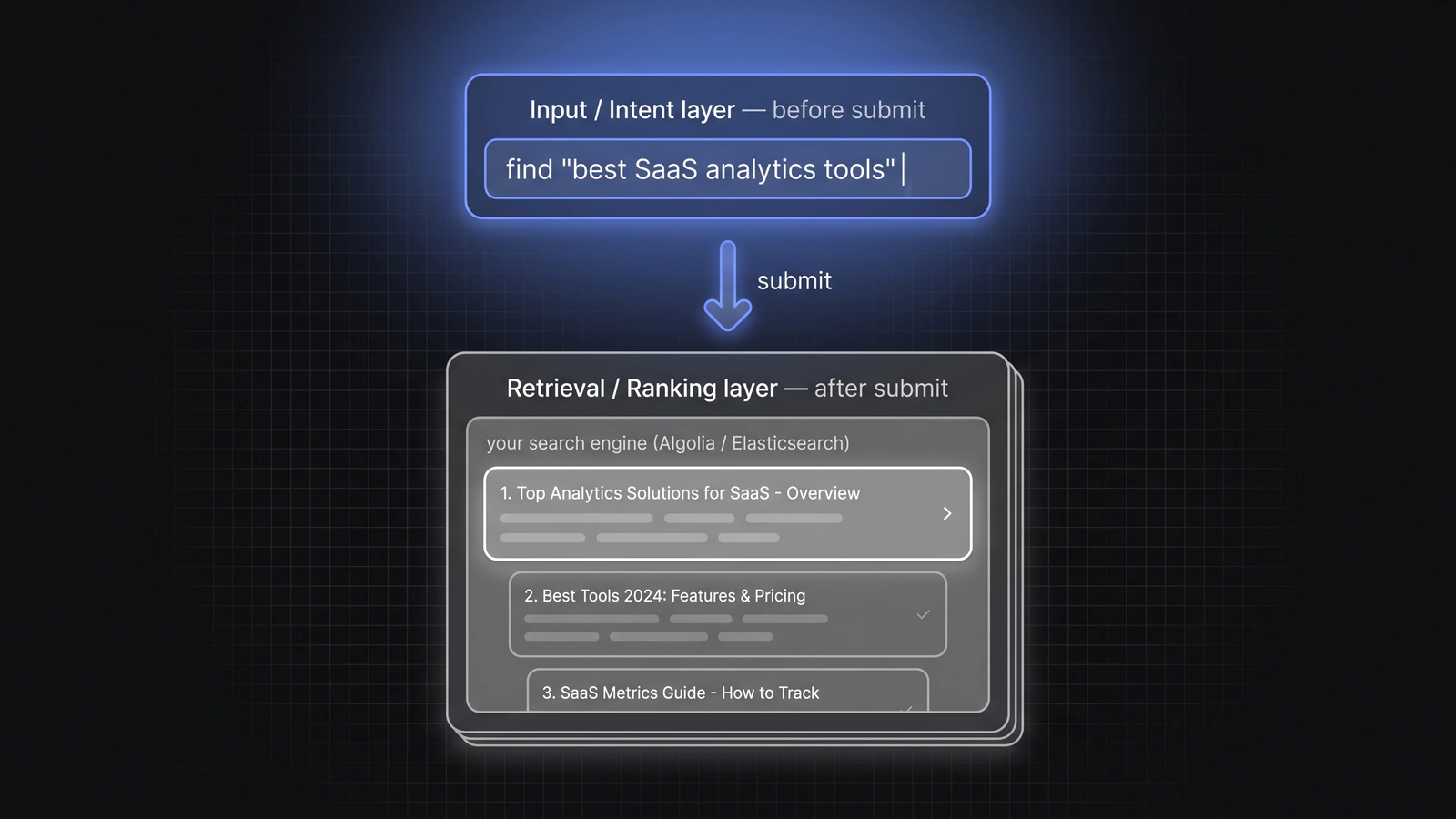
AI Autocomplete and the downstream system have two different jobs.
Before submit: AI Autocomplete completes the request
AI Autocomplete works while the user is typing. It reveals what is possible and gathers the missing details.
After submit: the existing product handles the request
A search engine retrieves and ranks results. A chatbot answers the question. An agent executes the task. The flow is simple:
User types → AI Autocomplete completes the request → the existing product handles it
This makes AI Autocomplete additive to the existing stack. A company using Algolia or Elasticsearch can keep the same index, search API, and ranking logic, since AI Autocomplete simply gives the search engine a richer query. A company with a chatbot can keep the same model and conversation system; AI Autocomplete gives it a more complete first message. A company with an agent can keep the same tools and execution layer; AI Autocomplete gives the agent a better brief before it begins.
Better input creates more powerful products
The quality of an output is limited by the quality of the request. Teams often try to solve weak results by improving the search engine or using a stronger model. But many failures begin earlier: the product received too little information. AI Autocomplete improves the input itself.
Search gets richer queries
Instead of receiving "black dress", a search engine can receive:
"black midi dress for a summer wedding, size 6, under $200, available by Friday"
The same retrieval system now has enough information to return much more relevant results.
Agents receive a complete brief
Instead of receiving "build a running app", an agent can receive a request that includes authentication, habit tracking, notifications, integrations, and a visual style. What previously required several follow-up messages can happen before the first submission.
Users discover more of the product
Users often understand more about what they want than they express in the first two words they type. They may know the occasion, budget, timing, preferences, and constraints, but leave most of that unstated.
AI Autocomplete pulls those details forward. It also exposes capabilities and options the user may not have known were available. It does not only capture intent. It helps form intent and pulls discovery into the text box.
The result
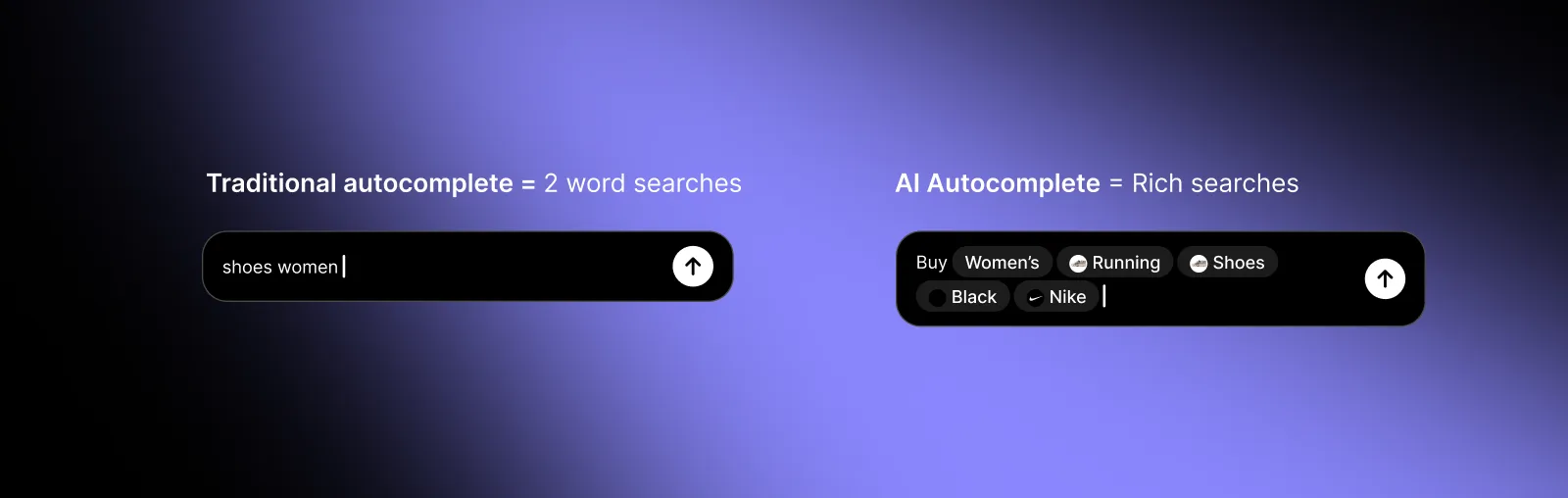
Richer requests
Users provide more of the information the product needs before submit. This produces better searches, stronger recommendations, more complete instructions, and more actionable requests.
A faster user experience
A better first request means fewer searches, fewer filters, and fewer rounds of clarification. The product feels faster because the user reaches the desired result in fewer steps.
Better discovery and higher conversion
A blank text box hides the product's capabilities. AI Autocomplete makes those capabilities visible while the user types. Users can discover more of what the product offers and reach relevant outcomes more consistently. In the AI Autocomplete launch article, we reported up to 30% more sales from search.
Lower costs
Incomplete requests force search systems to infer more and AI systems to ask more questions. A complete request can reduce follow-up messages, repeated searches, and unnecessary model calls. The result is a better experience for the user and less work for the product.
Built for real-time product experiences
AI Autocomplete runs while the user types, so it has to feel immediate. It is built specifically for per-keystroke suggestions rather than general-purpose conversation. The system is designed to return predictions much faster and cheaper than a standard LLM call, with the goal of returning most suggestions in roughly 200 to 300 milliseconds.
Teams can connect product data such as catalogs, prices, inventory, available actions, and custom fields so the suggestions reflect what the product can actually offer.
They can start with a customizable SDK or use the API directly to build their own interface, and the documentation covers both. The existing search engine, chatbot, or agent remains in place.
Key takeaways
- Traditional autocomplete predicts the next word. AI Autocomplete predicts the full request.
- AI Autocomplete solves the blank text box problem. It shows users what the product can do and which details matter.
- AI Autocomplete is the intent layer before search, chat, and agents. It improves the request before the existing system receives it.
- It combines chat and UI. Users get the speed and flexibility of natural language with the discoverability and precision of an interface.
- Better input changes the product downstream. It creates richer requests, faster experiences, better discovery, higher conversion, and lower costs.
- The existing stack stays in place. AI Autocomplete improves what goes into the search engine, chatbot, or agent.
Frequently asked questions
What is AI Autocomplete?
AI Autocomplete is the next evolution of autocomplete. It sits inside a text box and helps users discover and complete actions in real time. Traditional autocomplete predicts the next word. AI Autocomplete predicts the full request.
Why is AI Autocomplete important?
AI products are becoming blank text boxes that can do almost anything but show users very little. AI Autocomplete makes the product's capabilities visible and helps users provide the information required to get a good result.
How is AI Autocomplete different from traditional autocomplete?
Traditional autocomplete predicts the next word using indexed phrases and historical searches. AI Autocomplete uses real-time intent, context, product logic, and product data to help complete the full request.
Does AI Autocomplete replace traditional autocomplete?
Yes. AI Autocomplete can replace the traditional autocomplete layer because it performs the same basic job and goes much further. It predicts the full request rather than only the next word.
Does AI Autocomplete replace my search engine, chatbot, or agent?
No. AI Autocomplete works before submit and improves the request. The existing search engine, chatbot, or agent still retrieves results, answers the question, or performs the action afterward.
Can AI Autocomplete work with Algolia or Elasticsearch?
Yes. AI Autocomplete completes the request before submit, then passes the richer query and filters into the existing Algolia or Elasticsearch search call. The index, API, and ranking logic can remain unchanged.
What information can AI Autocomplete use?
It can use the user's real-time intent, the current context, product capabilities, catalogs, prices, inventory, available actions, custom fields, and other connected product data.
What are the main benefits?
The main benefits are richer requests, faster user experiences, better discovery, higher conversion, fewer follow-up questions, and lower costs.
Put the intent layer in your text box
Show users what your product can do while they type, and hand your search, chat, or agent a complete request every time.
Try it at AI-Autocomplete.com